Skip to content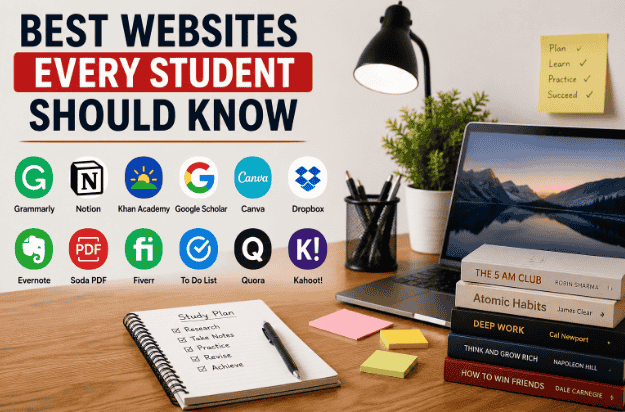
I still remember how badly I used to waste time when I first started studying seriously online. Every time I needed notes explanations, or help with homework I would open random websites from Google and end up even more confused than before.
Some websites looked useful but were filled with ads. Others had outdated information. And honestly I spent more time searching for help than actually studying.
Things changed when I started finding websites that students genuinely use every day not just the ones people randomly recommend in “top 10” lists without ever using them.
Over time I built a small collection of websites that actually made studying easier, faster, and less stressful. Some helped me understand difficult concepts, some improved my writing, and a few surprisingly saved me hours during assignments.
So instead of giving you a boring list with no real experience behind it, I’ll share the websites I’ve personally found useful as a student and why I think they genuinely matter.
1. YouTube – Better Than Many Classrooms Sometimes
I know this sounds obvious, but YouTube honestly became one of the biggest reasons I improved in difficult subjects.
There were topics in math that I simply could not understand from textbooks alone. But after watching a few step-by-step explanations from good teachers, things started making sense much faster.
The best thing about YouTube is that you can:
- pause videos
- replay explanations
- learn at your own speed
I personally use it for:
- math concepts
- science explanations
- tech tutorials
- productivity tips
One Mistake I Made
At first, I watched too many “study motivation” videos instead of actually studying.
Eventually, I learned to use YouTube as a learning tool, not a distraction.
2. Google Docs – Surprisingly Useful for Students
Before using Google Docs, I used to keep assignments on random USB drives and sometimes lost files completely.
Google Docs made things much easier because:
- files save automatically
- you can access notes from any device
- sharing assignments becomes simple
I now use it for:
- assignment writing
- article drafting
- notes
- collaborative work
Honestly, automatic saving alone has saved me multiple times.
3. Canva – Not Just for Designer
I originally thought Canva was only for graphic designers.
Turns out, students can use it for:
- presentations
- resumes
- project covers
- posters
- study planners
One time I had to make a presentation quickly, and Canva templates honestly made it look far more professional than I expected.
Even the free version is more than enough for most students.
4. Khan Academy – One of the Best Free Learning Websites
When I first discovered Khan Academy, I was shocked that such high-quality lessons were completely free.
It explains subjects in a very simple way especially:
- math
- science
- economics
What I personally like is that lessons feel less stressful compared to traditional textbooks.
If you struggle with basics in any subject, this website can genuinely help.
5. Wolfram Alpha – A Lifesaver for Math Students
I first used Wolfram Alpha during a difficult algebra problem, and honestly, it felt almost unfair how quickly it solved things.
But here’s the important part:
don’t use it just to copy answers.
The real value comes from:
- understanding steps
- checking mistakes
- learning methods
I mostly use it to verify whether my answers are correct.
6. Grammarly – Helpful for Better Writing
Even strong students make grammar mistakes sometimes, especially while typing quickly.
Grammarly helps improve:
- spelling
- punctuation
- sentence clarity
I use it mainly when writing:
- assignments
- emails
- blog posts
- reports
One thing I learned is that Grammarly suggestions are helpful, but you should still keep your own writing style natural.
7. Quizlet – Makes Memorizing Easier
I used to hate memorizing definitions and terms.
Quizlet made revision easier because you can create:
- flashcards
- quizzes
- practice tests
This became especially useful before exams.
Instead of reading the same notes repeatedly, interactive revision feels more engaging.
8. Notion – Great for Organizing Student Life
I’ll be honest — I used to forget deadlines constantly.
Assignments, tests, ideas, reminders… everything became messy.
Notion helped organize:
- study schedules
- notes
- tasks
- content ideas
It takes a little time to understand initially, but once you get comfortable with it, it becomes extremely useful.
9. Coursera – Useful for Learning Extra Skills
One mistake many students make is relying only on school learning.
I started exploring online courses and realized there are many useful skills schools never teach properly.
Coursera offers courses on:
- coding
- marketing
- business
- AI
- productivity
Some courses are paid, but many can still be accessed for free in audit mode.
10. Google Translate – More Helpful Than People Think
Most students use Google Translate only for simple word translation.
But I’ve also used it for:
- understanding difficult sentences
- pronunciation
- language practice
It’s not perfect, but it’s surprisingly useful for quick understanding.
How These Websites Actually Helped Me
At one point, I realized something important:
Being a student is no longer just about textbooks.
Students today also need:
- digital skills
- organization
- online learning habits
- productivity tools
The websites above helped me:
- save time
- learn faster
- stay organized
- improve writing
- understand difficult subjects
And honestly, some of them even reduced study stress.
Common Mistakes Students Make Online
1. Using Too Many Websites at Once
I made this mistake myself.
I bookmarked dozens of “study websites” and ended up using almost none properly.
Now I prefer keeping a small set of reliable tools.
2. Copy-Pasting Without Understanding
This is especially common with homework help websites.
Using online tools for learning is good.
Blind copying is not.
The real improvement comes when you understand the process.
3. Wasting Time Instead of Studying
Sometimes students open educational websites but quickly get distracted by unrelated content.
This happens a lot on YouTube.
Try setting a clear goal before opening any study platform.
A Simple Study Workflow That Works for Me
Here’s the basic setup I personally follow now:
Step 1 – Learn Concepts
I use:
- YouTube
- Khan Academy
Step 2 – Solve Problems
I check answers with:
- Wolfram Alpha
- Quizlet
Step 3 – Write Assignments
I use:
- Google Docs
- Grammarly
Step 4 – Organize Tasks
I track everything inside Notion.
This system feels much less stressful than trying to manage everything mentally.
Are These Websites Enough for Students?
Honestly yes.
Most students don’t need expensive software or paid subscriptions in the beginning.
The websites mentioned above are already powerful enough for:
- studying
- productivity
- assignments
- skill building
- organization
The biggest difference comes from how consistently you use them.
Final Thoughts
The internet can either waste your time or improve your learning it honestly depends on how you use it.
The websites in this list are not magic shortcuts, but they genuinely make student life easier when used properly.
Some helped me understand difficult topics faster.
Some improved my writing.
Some simply made studying less frustrating.
If you’re a student, start with a few simple tools first instead of trying everything at once.
A small set of useful websites used consistently is far better than saving fifty random tabs you never open again.
FAQs
Which website is best for students to learn online?
Websites like Khan Academy and YouTube are great for learning concepts in a simple way.
Are free educational websites enough for students?
Yes, many free websites provide high-quality learning resources, notes, tutorials, and productivity tools for students.
Which website is best for improving assignments and writing?
Google Docs and Grammarly help students write and organize assignments more effectively.
Can students use these websites on mobile phones?
Most educational and productivity websites work smoothly on both smartphones and laptops.
What is the biggest mistake students make while studying online?
Many students open too many tabs or get distracted instead of focusing on one useful website at a time.

Hi, I’m the creator of Trend Verse — a digital platform focused on technology, AI tools, blogging, SEO, WordPress, and online earning. My goal is to share simple, practical, and beginner-friendly guides that help people learn digital skills, grow online, and stay updated with the latest tech trends.