Skip to content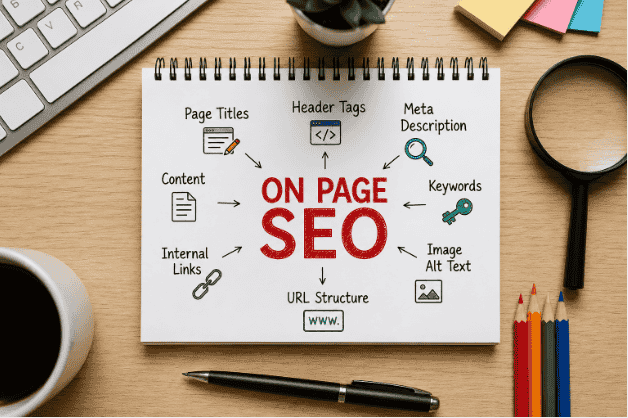
The first time I heard someone say, Just do proper on page SEO and Google will rank your content, I honestly thought they were oversimplifying everything.
At that time, I had already published around 15 blog posts on my website. I was writing consistently, adding images, and even sharing articles on Facebook groups. But traffic? Almost nothing.
One day I checked Google Search Console and saw something frustrating: my posts were getting impressions but barely any clicks. That’s when I realized something important my content wasn’t optimized properly for search engines or even for readers.
I used to think on-page SEO meant stuffing keywords everywhere. Turns out, it’s more about helping both Google and real people understand your content clearly.
After fixing a few basic things, some of my articles slowly started moving from page 5 to page 1. No backlinks. No expensive tools. Just better on-page optimization.
What Is On Page SEO (In Simple Words)?
On page SEO means optimizing the content and structure of a page so search engines can understand it better.
This includes things like:
- Titles
- Headings
- Keywords
- Images
- Internal links
- URLs
- Meta descriptions
- Content readability
Basically it’s the stuff you control directly on your website.
And honestly, this is one of the few SEO areas beginners can improve quickly without needing technical expertise.
The Biggest Mistake I Made Early On
When I started blogging I wrote articles based on what I wanted to say instead of what people were actually searching for.
For example, I once wrote an article titled:
“Thoughts About Modern Blogging”
Nobody searches for that.
Later I changed it to:
“How to Start a Blog in 2026”
That single change improved impressions almost immediately.
The lesson was simple:
People search for solutions, not creative titles.
Step 1: Start With Search Intent
Before writing anything now I ask myself:
“What exactly does the reader want?”
If someone searches:
- “Best AI tools for students”
- “How to rank a blog post”
- “WordPress speed optimization”
They expect practical answers not long motivational intros.
This one habit improved my bounce rate more than any plugin.
A Simple Trick I Use
I search the keyword on Google and check:
- What type of articles are ranking
- How they structure headings
- What questions people ask in comments
- Google’s “People Also Ask” section
This gives me a clear idea of what users actually want.
Step 2: Write Better Titles (Not Clever Ones)
Your title is one of the biggest ranking and click factors.
Earlier, I used vague titles like:
- “My SEO Journey”
- “Thoughts on Blogging”
Now I use titles like:
- “On Page SEO Checklist for Beginners”
- “How I Improved Blog Rankings Using Simple SEO Fixes”
Notice the difference?
The second version tells people exactly what they’ll get.
What Works Best for Me
I try to include:
- The main keyword naturally
- A clear benefit
- Simple wording
I avoid clickbait because it increases bounce rate.
Step 3: Use Headings Properly
This sounds basic but I ignored it for months.
I used to write giant walls of text with random bold lines.
Now I structure articles like this:
- H1 = Main title
- H2 = Main sections
- H3 = Subtopics
This helps both readers and Google understand the article flow.
It also makes long articles less overwhelming on mobile devices.
Step 4: Optimize URLs
I once published URLs like this:
example.com/post-2025-final-new-versionTerrible idea.
Now I keep URLs short and clean.
Example:
example.com/on-page-seoShort URLs are easier to remember, cleaner to share, and look more trustworthy.
Step 5: Internal Linking Changed Everything
This was one of the biggest improvements on my website.
Earlier every article was isolated. No connections.
Then I started linking related posts naturally.
Example:
If I write about SEO plugins, I link to:
- keyword research articles
- speed optimization guides
- Rank Math tutorials
This helped:
- users stay longer
- Google crawl more pages
- lower bounce rate
I personally noticed traffic improvements after building proper internal links.
Step 6: Don’t Ignore Image Optimization
I used to upload huge PNG images directly from Canva.
My pages became painfully slow.
Then I started:
- compressing images
- using WebP format
- renaming image files properly
Example:
Instead of:
IMG_83733.pngI now use:
on-page-seo-checklist.webpTools I Use
- Canva
- TinyPNG
- ShortPixel
- Squoosh
All beginner-friendly.
Step 7: Write for Humans First
There was a time when I forced keywords everywhere.
Example:
“On-page SEO is the best on-page SEO strategy for on-page SEO beginners.”
It sounded awful.
Now I focus on natural writing.
Google has become much smarter. If your content genuinely helps people, that matters more than repeating keywords 50 times.
I still use keywords just naturally.
Step 8: Improve Readability
Most people don’t read blog posts word by word.
They scan.
That changed how I write.
Now I use:
- short paragraphs
- bullet points
- subheadings
- simple language
Especially on mobile.
If a paragraph looks too long on my phone screen, I break it.
Step 9: Meta Descriptions Actually Matter
For a long time, I ignored meta descriptions completely.
Big mistake.
Your meta description is basically your article’s mini advertisement on Google.
A good one improves click through rate.
Example
Bad:
This article explains SEO.Better:
Learn practical on-page SEO techniques that helped improve my blog rankings and traffic without complicated strategies.Simple. Clear. Helpful.
Step 10: Use SEO Plugins — But Don’t Depend on Them
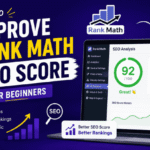
I use Rank Math SEO on my WordPress websites.
It helps with:
- meta titles
- schema
- XML sitemaps
- readability checks
But here’s the thing:
A green SEO score doesn’t automatically mean good content.
I’ve seen badly written articles get “100/100 SEO scores.”
Use plugins as guidance, not as your brain.
Real Changes I Noticed After Improving On Page SEO
After consistently optimizing my articles, I started noticing:
- More impressions in Search Console
- Better click-through rates
- Longer session duration
- More pages indexed
- Lower bounce rate
One article that barely got traffic suddenly started getting daily clicks after:
- improving headings
- rewriting the title
- adding internal links
- optimizing images
No backlinks involved.
That’s when I realized how powerful on-page SEO really is.
Common On-Page SEO Mistakes Beginners Make
1. Writing Without Keyword Research
If nobody searches for the topic, ranking becomes harder.
2. Stuffing Keywords Everywhere
This makes content unreadable.
3. Ignoring Mobile Users
Most visitors come from phones now.
Always preview your article on mobile.
4. Using Huge Images
Slow pages hurt rankings and user experience.
5. Writing Only for Google
If readers don’t enjoy the content, rankings usually don’t last.
My Simple On-Page SEO Checklist
Before publishing any article, I quickly check:
✅ Clear title
✅ Proper headings
✅ Keyword used naturally
✅ Internal links added
✅ Images optimized
✅ Mobile readability checked
✅ Meta description written
✅ URL cleaned up
✅ Paragraphs short and readable
That’s it.
No complicated SEO formulas.
Final Thoughts
Honestly, on page SEO felt confusing when I first started blogging. There were too many “experts” making it sound overly technical.
But after working on real websites, I learned that most improvements come from simple habits done consistently.
You don’t need to become an SEO genius overnight.
Start with:
- better titles
- cleaner structure
- useful content
- faster pages
And most importantly, write like you’re helping a real person not trying to impress a search engine.
That mindset alone changed the way I create content, and it improved my results more than any shortcut ever did.
FAQs
What is on-page SEO?
On-page SEO means optimizing your content, headings, and website structure to improve rankings and user experience.
Why is on-page SEO important?
It helps search engines understand your content better and can increase organic traffic over time.
Can beginners learn on-page SEO easily?
Yes, beginners can learn basic on-page SEO by improving titles, keywords, headings, and internal links.
Does on-page SEO help websites rank faster?
Good on-page SEO can improve visibility, but rankings also depend on competition and content quality.
Which tool is best for on-page SEO?
Many bloggers use Rank Math SEO because it’s beginner-friendly and easy to use.

Hi, I’m the creator of Trend Verse — a digital platform focused on technology, AI tools, blogging, SEO, WordPress, and online earning. My goal is to share simple, practical, and beginner-friendly guides that help people learn digital skills, grow online, and stay updated with the latest tech trends.