Skip to content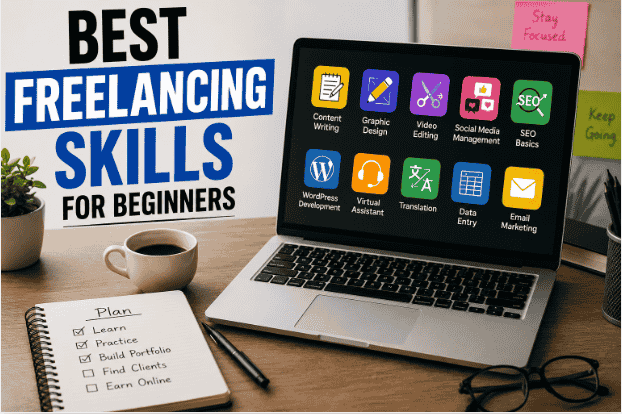
I still remember how confused I felt when I first started looking into freelancing.
Everywhere I looked, people were saying different things.
One person said:
“Learn coding.”
Another said:
“Start graphic design.”
Someone else claimed:
“AI will replace everything anyway.”
Honestly, I wasted a lot of time jumping between random skills because I thought freelancing success depended on finding some secret “perfect skill.”
It doesn’t.
What matters more is:
- choosing one realistic skill
- practicing consistently
- staying patient long enough to improve
Most beginners fail because they either:
- try learning too many things at once
- expect fast money
- quit before getting decent at anything
I made all three mistakes myself.
Over time, I realized freelancing becomes much easier once you stop chasing hype and focus on practical beginner-friendly skills that real clients actually need.
So instead of giving you a fake “become rich quickly” list, this article covers freelancing skills that beginners can realistically start learning in 2026 — even without expensive equipment or years of experience.
What Makes a Good Freelancing Skill for Beginners?
Before choosing a skill, beginners should understand something important.
A good beginner freelancing skill usually:
- has real demand
- can be practiced from home
- doesn’t require expensive tools
- improves gradually over time
- allows small projects initially
That’s why simple practical skills often work better than overly advanced ones in the beginning.
1. Content Writing
This is honestly one of the most beginner friendly freelancing skills available right now.
I started practicing writing simply by:
- rewriting articles
- improving descriptions
- creating small blog posts
At first, my writing felt awkward and robotic.
But the more I practiced, the more natural it became.
Clients often need:
- blog articles
- product descriptions
- website content
- captions
- email writing
Useful beginner tools:
- Grammarly
- Google Docs
One Mistake I Made
I focused too much on sounding “professional” instead of sounding human.
Natural writing usually works better online.
2. Canva Designing
A lot of beginners think graphic design requires advanced software immediately.
That’s not always true.
Canva made beginner designing much easier than I expected.
Students and beginners can create:
- thumbnails
- social media posts
- Pinterest pins
- resumes
- presentations
- posters
The best part is:
you can improve quickly through practice.
I’ve seen beginners start getting small design projects surprisingly fast after building a few decent samples.
3. Video Editing
Short-form content is growing everywhere:
- YouTube Shorts
- TikTok
- Instagram Reels
That means editing skills are in demand.
And honestly, beginners do not need expensive editing setups initially.
Many people start with:
- phones
- basic laptops
- free editing apps
Popular beginner tools:
- CapCut
- VN Video Editor
One thing I noticed:
simple clean editing usually performs better than overcomplicated effects.
4. Social Media Management
This skill surprised me because many small businesses genuinely struggle to stay active online consistently.
Tasks usually include:
- posting content
- replying to comments
- scheduling posts
- basic designing
- writing captions
Some beginners start managing:
- local business pages
- small Instagram accounts
- student brands
Useful tools:
- Buffer
- Canva
This can become a practical starting point for students.
5. Thumbnail Designing
YouTube creators constantly need thumbnails.
I originally thought thumbnail design was “easy.”
Then I realized:
good thumbnails require:
- attention
- readability
- contrast
- curiosity
Even beginners can improve quickly by:
- studying existing thumbnails
- recreating styles
- practicing daily
Canva works surprisingly well for this skill too.
6. WordPress Website Setup
Many beginners assume web development means advanced coding immediately.
But simple WordPress setup services are already valuable.
Clients often need help with:
- installing WordPress
- setting themes
- organizing pages
- basic SEO plugins
- blog setup
You can learn a lot simply by building your own blog first.
That practical experience matters.
Useful platform:
WordPress
7. SEO Basics
SEO felt extremely confusing when I first started learning it.
There were too many:
- opinions
- strategies
- technical terms
Eventually, I realized beginners don’t need to master advanced SEO immediately.
Basic SEO services already help:
- keyword research
- meta descriptions
- internal linking
- image optimization
- readability improvements
Even learning SEO for your own blog builds useful experience.
8. Virtual Assistance
Some freelancers earn online by helping businesses with simple tasks like:
- emails
- scheduling
- data organization
- research
- spreadsheets
This skill relies heavily on:
- communication
- organization
- reliability
And honestly, reliability matters more than people realize.
Businesses value freelancers who communicate properly and complete work consistently.
9. Data Entry
This is often one of the first skills beginners explore.
While it may not become a high-income skill long term, it can help beginners:
- gain confidence
- learn client communication
- understand freelancing platforms
The important thing is avoiding fake “easy money” data entry scams online.
10. AI-Assisted Content Work
AI tools are changing freelancing quickly.
But honestly, AI has not completely replaced freelancers the way people expected.
Instead many freelancers now combine:
- human creativity
- editing
- organization
- AI assistance
Useful AI tools:
- ChatGPT
- Claude
The freelancers who usually perform best are the ones who:
- use AI efficiently
- still add human quality
- improve output manually
Skills Beginners Should Avoid Starting With
Honestly, some skills become overwhelming too early.
For example:
- advanced coding
- complicated animation
- high-level cybersecurity
These are valuable skills eventually.
But many beginners quit because the learning curve feels too heavy initially.
Simple practical skills usually build momentum faster.
How Beginners Can Choose the Right Skill
This helped me personally.
Instead of asking:
“What skill makes the most money?”
Ask:
“What skill can I realistically practice consistently for months?”
That question matters more.
Because freelancing rewards consistency more than excitement.
A Simple Beginner Plan That Actually Makes Sense
Step 1 – Pick One Skill
Do not try learning:
- writing
- editing
- coding
- designing
all together initially.
Choose one.
Step 2 – Practice Daily
Even:
- 1 hour daily
- small projects
- sample work
helps more than endlessly watching tutorials.
Step 3 – Create Portfolio Samples
Most beginners wait for real clients before creating examples.
That slows progress.
Create:
- sample thumbnails
- practice articles
- fake social media posts
- demo projects
Portfolio examples matter.
Step 4 – Start Small
Your first projects may:
- pay little
- feel difficult
- take longer
That’s normal.
Freelancing improves gradually.
Step 5 – Improve Communication
This matters more than many beginners realize.
Clients appreciate freelancers who:
- reply clearly
- stay professional
- communicate honestly
Even average skills can improve faster with good communication habits.
Common Beginner Freelancing Mistakes
Expecting Instant Results
This is the biggest one.
Many beginners quit after:
- one week
- zero clients
- low engagement
Freelancing usually takes time.
Learning Too Many Skills
I personally wasted months doing this.
Switching constantly slows progress badly.
Comparing Yourself to Experts
Experienced freelancers:
- have portfolios
- client reviews
- years of experience
Beginners need time too.
Watching More Than Practicing
Learning matters.
But real improvement usually comes from:
- doing projects
- making mistakes
- improving gradually
Final Thoughts
The best freelancing skills for beginners are usually not the flashiest ones.
They’re the skills that:
- solve real problems
- can be practiced consistently
- improve over time
- help build confidence
You do not need expensive equipment or expert-level knowledge to start.
Most freelancers improve while working on small projects and learning through experience.
And honestly, that’s probably the most realistic freelancing path in 2026.
FAQs
What is the best freelancing skill for beginners in 2026?
Content writing, Canva designing, video editing, and social media management are beginner-friendly freelancing skills with growing demand.
Can beginners start freelancing without experience?
Yes, many beginners start freelancing by learning one simple skill and building practice projects before getting clients.
Which freelancing skill is easiest to learn?
Canva designing and content writing are often easier for beginners because they require basic tools and consistent practice.
How long does it take to learn a freelancing skill?
It depends on the skill and practice time, but many beginners improve noticeably within a few months of regular learning.
Do beginners need expensive tools for freelancing?
No, many freelancing skills can be started with free tools, a basic laptop, and an internet connection.
Hi, I’m the creator of Trend Verse — a digital platform focused on technology, AI tools, blogging, SEO, WordPress, and online earning. My goal is to share simple, practical, and beginner-friendly guides that help people learn digital skills, grow online, and stay updated with the latest tech trends.