Skip to content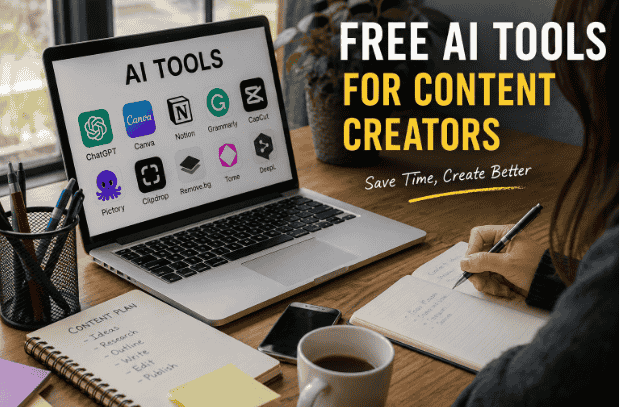
A few months ago, I spent almost three hours writing captions for a client’s Instagram page. Not designing graphics. Not editing videos. Just captions.
By the end of it, I was staring at my laptop thinking, “There has to be a smarter way to do this.”
That was the point where I stopped ignoring AI tools and actually started testing them properly.
At first, I was skeptical. Most “top AI tools” lists online felt like they were written by people who never used the tools themselves. Either everything was “game-changing” or the article was stuffed with affiliate links and hype.
So I started trying them during actual client work.
Some were terrible. Some made my writing sound robotic. A few completely misunderstood what I wanted. But a handful genuinely helped me save hours every week especially for brainstorming, scripting, editing, thumbnails, and repurposing content.
The best part? Many of them are free.
If you’re a content creator, blogger, YouTuber, freelancer, or even just someone trying to stay consistent online, these are the free AI tools that are genuinely useful in real-world work.
Not perfect. But useful.
1. ChatGPT — Best for Brainstorming and First Drafts
I know this one sounds obvious, but most people use ChatGPT the wrong way.
They ask it to “write an article,” copy the output, and then wonder why the content feels lifeless.
What actually works is using it like a creative assistant.
For example, when I’m stuck on video ideas, I’ll give it context like:
- my niche
- target audience
- what already performed well
- what felt boring recently
Then I ask for angles, hooks, or title ideas.
That’s where it becomes genuinely helpful.
I’ve also used it for:
- YouTube script outlines
- blog structure ideas
- rewriting awkward paragraphs
- generating email subject lines
- turning long content into short social posts
One thing I learned the hard way: the better your input, the better the output.
If your prompt is vague, the result usually sounds generic.
Instead of saying:
“Write a YouTube intro.”
Try:
“Write a casual YouTube intro for a productivity video aimed at college students who struggle with procrastination.”
Huge difference.
Mistake I Made Early On
I relied too much on AI-generated wording.
After a while, everything started sounding overly polished and weirdly similar. Readers notice that.
Now I use AI for speed, but I still rewrite sections in my own tone.
That combination works much better.
2. Canva AI — Surprisingly Useful for Non-Designers
I’ve used Canva for years, but their AI features became genuinely useful recently.
Especially for creators who hate designing thumbnails or social posts from scratch.
The “Magic Design” feature can generate layouts based on a simple prompt. It’s not always perfect, but it gives you a strong starting point.
A few real situations where it saved me time:
- Creating YouTube thumbnails quickly
- Turning blog points into carousel posts
- Making Pinterest graphics
- Removing backgrounds from product photos
- Generating social media templates
One unexpected benefit?
It reduced decision fatigue.
Sometimes the hardest part of content creation is staring at a blank screen wondering where to start.
Even a rough AI-generated design helps break that mental block.
What I Wouldn’t Use It For
I still wouldn’t rely on AI-generated graphics for branding heavy projects.
Sometimes the designs look too “template-like.”
But for fast content? It’s honestly great.
3. CapCut AI Tools — Huge Time Saver for Short Videos
I avoided CapCut for a long time because I assumed it was just for TikTok edits.
Turns out, it’s one of the easiest editing tools for creators who don’t want to spend hours inside professional software.
The AI features I use most:
- Auto captions
- Background noise removal
- AI-generated subtitles
- Silence remover
- Auto cut suggestions
The auto-caption feature alone saved me ridiculous amounts of time.
Before that, I was manually syncing captions for short-form videos. Absolute nightmare.
Now I can upload a clip, generate captions, tweak a few mistakes, and export within minutes.
One Important Lesson
Always review AI captions manually.
Sometimes the tool confidently turns simple words into complete nonsense.
I once posted a clip where “content calendar” became “content cylinder.”
Nobody mentioned it immediately, which somehow made it worse.
4. Grammarly — Still One of the Most Practical AI Writing Tools
A lot of creators ignore Grammarly because it feels basic compared to newer AI tools.
Honestly, I still use it daily.
Not because it writes for me, but because it catches small mistakes my brain skips after hours of editing.
Especially when:
- writing blog posts late at night
- replying to clients quickly
- editing newsletters
- polishing scripts
The tone suggestions can also help if your writing sounds too stiff.
One thing I appreciate is that it doesn’t completely take over the writing process. It improves clarity without replacing your voice entirely.
That balance matters.
5. Notion AI — Best for Organizing Content Ideas
My content ideas used to live everywhere.
Phone notes. Google Docs. Random screenshots. Half-finished drafts.
Total chaos.
Then I started using Notion properly.
The AI features inside Notion are surprisingly useful for creators managing multiple projects.
I use it for:
- content calendars
- script planning
- article outlines
- brainstorming
- summarizing research notes
One feature I genuinely like is turning messy notes into organized summaries.
After researching a topic for an hour, my notes usually look like a disaster.
Notion AI helps clean them up fast.
Small Warning
Don’t overcomplicate your setup.
A lot of creators spend more time building aesthetic dashboards than actually creating content.
Simple systems work better.
6. Pictory — Useful for Turning Articles Into Videos
This tool surprised me.
Pictory can convert blog-style text into short videos using stock visuals, subtitles, and AI voiceovers.
Would I use it for high-end cinematic YouTube videos?
No.
But for:
- repurposing blog posts
- faceless content
- quick explainers
- social clips
it works pretty well.
I tested it on an older blog article that barely got traffic anymore. Turned it into short-form video content, posted clips across platforms, and suddenly the old article started getting visits again.
That alone made the experiment worth it.
7. Remove.bg — The Tiny Tool That Saves Annoying Editing Time
This tool does one thing.
But it does it extremely well.
It removes image backgrounds automatically.
Sounds simple, but if you make thumbnails, product images, profile graphics, or promotional posts, it saves a surprising amount of time.
Before tools like this, background removal was one of those tedious tasks that interrupted creative flow.
Now it takes seconds.
Not flashy. Just useful.
How I Actually Combine These Tools in a Real Workflow
This is roughly how my weekly content process looks now:
Step 1: Brainstorm Ideas
I use ChatGPT for:
- topic angles
- hooks
- audience pain points
Step 2: Organize Everything
I move ideas into Notion.
This helps me plan:
- posting schedule
- drafts
- scripts
- client work
Step 3: Create Visuals
Canva handles:
- thumbnails
- social posts
- blog graphics
Step 4: Edit Videos
CapCut speeds up:
- captions
- cuts
- formatting for shorts
Step 5: Final Writing Cleanup
Grammarly catches:
- typos
- awkward wording
- readability issues
This workflow cut my production time almost in half.
Not because AI replaced creativity.
It removed repetitive tasks.
That’s the real value.
Common Mistakes Content Creators Make With AI Tools
1. Publishing Raw AI Output
People can tell.
Even if they can’t explain why, overly AI-generated content often feels empty.
Readers connect with:
- opinions
- experiences
- mistakes
- personality
AI can help structure content, but your perspective still matters.
2. Using Too Many Tools at Once
I made this mistake early on.
I signed up for every trending AI platform I saw on YouTube.
Result?
More confusion. More tabs. Less actual work.
Start with 2–3 tools that solve real problems in your workflow.
That’s enough.
3. Expecting AI to Replace Skill
AI helps speed things up.
But it won’t magically make bad content interesting.
Good storytelling, useful information, and understanding your audience still matter most.
The creators growing fastest right now are the ones combining AI efficiency with real human personality.
Free Doesn’t Always Mean Unlimited
A lot of these tools have free plans with limits.
Some restrict:
- exports
- credits
- AI generations
- watermark-free downloads
Still, for beginners or solo creators, the free versions are usually enough to get real value before paying for anything.
I’d recommend testing tools slowly instead of buying subscriptions immediately.
You’ll quickly notice which ones genuinely fit your workflow.
The Biggest Surprise After Using AI Tools for Months
I thought AI would make content creation feel less personal.
Weirdly, the opposite happened.
Because repetitive tasks take less time now, I spend more energy on:
- storytelling
- audience engagement
- creative ideas
- experimenting with formats
That’s the part people often misunderstand.
Good AI tools don’t replace creators.
They remove friction.
And honestly, when you’re juggling content, deadlines, editing, thumbnails, emails, and social media alone… reducing friction matters a lot.
Especially on days when motivation completely disappears.
Some tools are overhyped.
Some are genuinely useful.
The trick is learning which ones actually help you create better content faster — without losing your own voice in the process.
FAQs
1. What are the best free AI tools for content creators?
Some popular free AI tools include ChatGPT, Canva AI, CapCut, Grammarly, and Notion AI for writing, editing, and content planning.
2. Can AI tools help beginners create content?
Yes, AI tools can help beginners with ideas, captions, video editing, thumbnails, and writing without needing advanced skills.
3. Are free AI tools good enough for professional content creation?
Many free AI tools are surprisingly powerful and work well for blogs, YouTube, social media, and freelance projects.
4. Which free AI tool is best for video editing?
CapCut is one of the best free AI-powered video editing tools for short videos, captions, and quick edits.
5. Can AI tools improve SEO content writing?
Yes, AI tools can help generate content ideas, improve readability, and organize articles for better SEO performance.
6. Is it safe to use AI-generated content on a blog?
Yes, but it’s important to edit and personalize AI-generated content so it sounds natural and valuable to readers.
7. Do free AI tools have limitations?
Most free plans come with limits like fewer exports, credits, or watermarked downloads, but they are enough for beginners.
8. Can AI replace content creators completely?
No, AI can speed up repetitive tasks, but creativity, storytelling, and personal experience still come from humans.
9. Which AI tool is best for writing blog posts?
ChatGPT and Grammarly are widely used for generating ideas, improving writing, and fixing grammar mistakes.
10. Are AI tools useful for social media content?
Yes, AI tools can help create captions, reels, graphics, hashtags, and content ideas for platforms like Instagram and TikTok.

Hi, I’m the creator of Trend Verse — a digital platform focused on technology, AI tools, blogging, SEO, WordPress, and online earning. My goal is to share simple, practical, and beginner-friendly guides that help people learn digital skills, grow online, and stay updated with the latest tech trends.